
 By
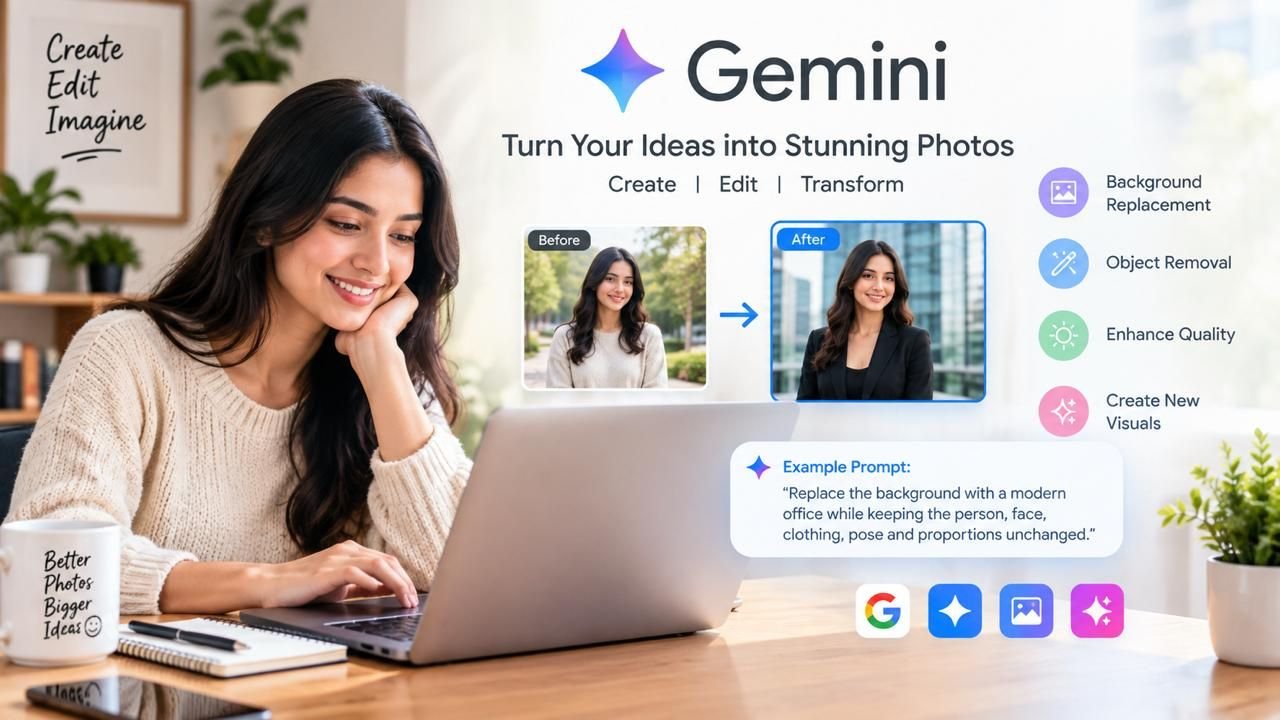
By Artificial intelligence has changed how people create, edit, and experiment with visual content. Tasks that once required advanced photography software or professional design skills can now be approached through natural-language instructions. AI Gemini Photo is one of the popular search terms associated with using Google’s Gemini ecosystem for image creation, transformation, and editing.
From professional portraits and social media graphics to artistic concepts and marketing visuals, AI-assisted photography gives users new ways to work with images. Instead of manually adjusting every element, users can describe what they want and refine the result through additional instructions.
This guide explains what AI Gemini Photo means, how AI photo editing works, how to create better prompts, and how creators and businesses can use AI-generated visuals responsibly.
What Is AI Gemini Photo?
AI Gemini Photo is a commonly used term for AI-assisted photo creation and editing through Google’s Gemini ecosystem. Depending on the Gemini product, model, account, region, and currently available features, users may be able to work with images and use natural-language instructions for supported creative tasks.
The biggest advantage is conversational interaction. Traditional editing software often requires knowledge of layers, masks, brushes, selections, filters, and color adjustments. With an AI-based workflow, users can explain their desired result using ordinary language.
For example, a user might request:
“Replace the background with a modern office while keeping the person’s face, hairstyle, clothing, pose, and proportions unchanged.”
The system attempts to understand the original image and apply the requested transformation. Results can vary, so every AI-created or AI-edited image should be reviewed before publication|.
Read more: Perplexity Comet | EU AI Act 2026 | What Is Agentic AI | Why Is My Computer Screen Red Tinted
Why Is AI Gemini Photo Popular?
The popularity of AI Gemini Photo reflects a broader shift toward accessible AI-powered content creation. People want tools that understand creative instructions without requiring extensive technical knowledge.
1. Simple Instructions
Users can describe an idea in natural language instead of learning complicated editing controls.
2. Faster Experimentation
A single photograph can become the starting point for different backgrounds, lighting styles, compositions, and creative concepts.
3. Accessible Creativity
Creators, freelancers, students, and small businesses can experiment with visual ideas without necessarily needing a professional design team.
4. Social Media Content
Instagram, YouTube, Pinterest, blogs, and other platforms require regular visual content. AI can help users explore fresh concepts efficiently.
5. Personalized Images
Instead of depending entirely on generic stock photography, users can describe a visual concept specifically suited to their audience or brand.
How Does AI Gemini Photo Technology Work?
At a basic level, multimodal AI can interpret information in an image and combine it with written instructions. When an image is provided, the system may identify elements such as people, objects, colors, lighting, clothing, backgrounds, and overall composition.
The written prompt then explains the requested change.
For example:
Original image: A portrait photographed indoors.
Instruction: “Place the subject in a professional photography studio with soft lighting and a neutral background.”
The AI attempts to combine the original image information with the requested transformation.
The final result depends on the source image, prompt quality, image complexity, and features available in the particular Gemini experience.
AI Gemini Photo for Beginners
Beginners should start with simple instructions rather than trying to describe every possible change at once.
Step 1: Choose a Clear Image
Use a reasonably clear photograph where the main subject is easy to identify. Blurry or heavily distorted images may be more difficult to transform successfully.
Step 2: Define One Main Objective
Decide what you want to change. Common objectives include:
- Changing the background
- Creating a professional portrait
- Improving composition
- Changing atmosphere
- Creating an illustration
- Developing a marketing concept
Step 3: Refine the Result
If the first result is not satisfactory, provide another instruction. For example:
“Keep the same person but make the lighting softer and reduce background distractions.”
This gradual approach can provide better control than writing an extremely complicated prompt immediately.
Gemini AI Photo Editor: What Can It Do?
People searching for a gemini ai photo editor are generally interested in AI-assisted image transformation. Depending on available functionality, users may explore:
- Background replacement
- Object removal
- Creative restyling
- Portrait concepts
- Artistic transformations
- Lighting changes
- Scene modifications
- Marketing visuals
- Social media creatives
For example, a creator could start with an ordinary portrait and describe a cinematic environment. The AI attempts to transform the image according to the instructions.
The main benefit of AI Gemini Photo workflows is that users can communicate creative intent through language rather than relying only on manual controls.
Gemini Photo AI for Social Media
Gemini Photo AI is especially relevant to social media creators because visual platforms require a continuous supply of engaging images.
A single photograph can potentially be explored as:
- A minimalist studio portrait
- A travel photograph
- An editorial fashion image
- A cinematic portrait
- A festive campaign
- A professional business photograph
However, creators should avoid using AI modifications to mislead audiences. When an image has been substantially altered, transparency may be appropriate, especially if it represents a real person, product, event, or location.
Gemini AI Photo Editing: How to Get Better Results
Successful gemini ai photo editing depends heavily on prompt clarity. A useful prompt can include:
Subject + requested change + environment + style + lighting + restrictions
For example:
“Edit this portrait by replacing the background with a modern office. Keep the person’s facial features, hairstyle, clothing, pose, and body proportions unchanged. Use soft natural window lighting and realistic shadows.”
This provides much more direction than simply saying, “Make this photo professional.”
Tell AI What to Preserve
When editing an existing photograph, specify important elements that should remain unchanged.
You can request:
- Preserve facial identity
- Keep original clothing
- Maintain the same pose
- Preserve natural skin texture
- Keep body proportions
- Maintain important objects
- Keep realistic shadows
- Avoid excessive retouching
These instructions can make an AI Gemini Photo edit more controlled.
Gemini AI Art: Turn Ideas Into Visual Concepts
Gemini AI art is another area where users can explore creative possibilities. AI can help turn written descriptions into visual concepts when the relevant image-generation functionality is available.
For example, a writer could visualize a fantasy city surrounded by mountains. A designer could explore futuristic architecture, while a marketer could develop an imaginative campaign concept.
Potential creative directions include:
- Fantasy scenes
- Futuristic environments
- Concept art
- Editorial imagery
- Digital illustrations
- Abstract artwork
- Storytelling visuals
- Product concepts
- Architectural concepts
AI does not eliminate the need for creative judgment. Users still need to evaluate composition, storytelling, brand suitability, and final quality.
How to Use Gemini Edit Photo Prompts
Users searching for gemini edit photo techniques should treat prompting as an iterative process.
Background Replacement
“Replace the background with a bright modern office. Keep the subject unchanged and match the lighting naturally.”
Professional Portrait
“Transform this portrait into a polished professional headshot. Use a neutral background, soft studio lighting, realistic skin texture, and a natural expression.”
Travel Concept
“Place the subject in a realistic mountain setting during golden hour. Preserve facial identity, clothing, and body proportions.”
Artistic Transformation
“Transform this image into a sophisticated editorial illustration while preserving the main subject and overall composition.”
These prompts provide a clear direction without unnecessarily complicating the request.
Google Gemini AI Photo Prompt Formula
A good Google Gemini AI photo prompt can follow a simple structure.
Start With an Action
Use terms such as:
- Create
- Edit
- Transform
- Replace
- Enhance
- Reimagine
- Generate
Describe the Subject
Identify whether the image contains a person, product, landscape, building, food, object, or illustration.
Define the Environment
Describe the location, background, season, time of day, and surroundings.
Define the Visual Style
You can specify:
- Photorealistic
- Cinematic
- Editorial
- Minimalist
- Vintage
- Studio photography
- Documentary
- Illustration
Add Lighting
Examples include soft daylight, golden hour, studio lighting, diffused light, dramatic side lighting, or natural window light.
Add Restrictions
Explain what should remain unchanged.
A complete Google Gemini AI photo prompt could be:
“Edit the uploaded portrait into a professional corporate photograph. Place the subject in a modern office with soft natural window lighting and subtle background blur. Preserve facial identity, hairstyle, clothing, pose, and natural skin texture. Keep the final image realistic and professionally composed.”
Gemini Photo Editor for Professional Images
A Gemini photo editor workflow can help users experiment with professional portrait concepts.
For example, freelancers may need profile photographs for websites, consultants may want professional-looking portraits, and creators may want consistent images across social media platforms.
Professional images generally benefit from subtle changes rather than excessive transformations. Important qualities include:
- Natural facial characteristics
- Realistic skin texture
- Appropriate lighting
- Correct proportions
- Authentic expression
- Consistent visual quality
Excessive retouching can make an image appear artificial and reduce viewer trust.
AI Gemini Photo for Marketing and Business
Businesses can use AI Gemini Photo workflows for several creative and marketing applications.
Website Content
AI can help teams develop supporting visual concepts for blogs, landing pages, and educational content.
Social Media Campaigns
Brands can explore imagery for seasonal promotions, announcements, educational posts, and campaigns.
Product Concepts
AI can help visualize products in different environments. However, businesses should ensure generated images do not falsely represent the actual product.
Advertising Ideas
Marketing teams can explore campaign concepts before investing in professional photography or full production.
Presentations
Conceptual AI visuals can make internal presentations, pitch decks, and proposals more engaging.
AI Image Gemini for Content Creators
The term AI image Gemini is associated with the broader use of Gemini AI for visual content.
Creators can potentially use AI at several stages:
Idea generation → visual experimentation → editing → refinement → publication
For example, a blogger writing about sustainable travel could describe a visual concept, explore possible imagery, and choose the style that best supports the article.
AI can therefore support the creative process even when the final published image is not completely AI-generated.
Common AI Photo Prompt Mistakes
Mistake 1: Vague Instructions
“Make this beautiful” does not provide enough direction. Explain what visual qualities you want.
Mistake 2: Too Many Changes
Changing the subject, clothing, background, lighting, composition, and artistic style simultaneously may make results harder to control.
Mistake 3: Forgetting Preservation Instructions
If identity, clothing, or pose matters, clearly state that these elements should remain unchanged.
Mistake 4: Ignoring Details
Carefully check hands, facial features, text, logos, jewelry, product details, and background objects.
Mistake 5: Publishing Without Review
Even an attractive image may contain unnatural details when examined closely.
How to Make AI Photos Look Realistic
Realistic AI Gemini Photo results depend on several factors working together.
Consistent Lighting
Lighting on the subject should make sense with the surrounding environment.
Natural Shadows
Shadows should correspond to the direction and intensity of the light source.
Correct Proportions
People and objects should have believable proportions relative to their surroundings.
Natural Skin Texture
Overly smooth skin can make portraits look artificial.
Realistic Perspective
Objects should maintain believable scale, depth, and perspective.
Instead of simply writing “make it realistic,” describe these qualities in the prompt.
Privacy and Safety Considerations
Before uploading a photograph to an AI service, consider the information contained in it.
Avoid unnecessarily sharing images containing:
- Sensitive personal information
- Private documents
- Confidential business material
- Identification details
- Personal addresses
- Images of people without appropriate permission
Businesses should also establish policies for employee, customer, and proprietary images.
Privacy practices, retention policies, and service terms can change, so users should review the applicable official documentation before submitting sensitive content.
Can AI Gemini Photo Replace Traditional Editing?
AI can reduce manual work for certain tasks, but it does not completely replace professional photography or traditional editing software.
Traditional tools remain valuable for:
- Pixel-level control
- Precise masking
- Advanced color grading
- Professional retouching
- Complex compositing
- Exact product representation
- Detailed print preparation
The most effective approach is often to treat AI Gemini Photo as an additional creative tool and combine it with conventional editing when necessary.
SEO Best Practices for AI Image Content
If you are creating content around AI photography, visual optimization should be part of your SEO strategy.
- Use descriptive image filenames.
- Write accurate and useful alt text.
- Place images in relevant article sections.
- Optimize image file sizes for performance.
- Use headings based on real user questions.
- Avoid unnecessary keyword repetition.
- Provide clear answers alongside detailed information.
A balanced content strategy can help build topical relevance around AI Gemini Photo and related AI image searches.
The Future of AI Photography
The future of AI photography is likely to become increasingly conversational. Users may be able to describe complete creative objectives instead of manually adjusting individual settings.
A creator could explain the desired scene, mood, composition, audience, and brand style and then refine the result through conversation.
For businesses, this could make visual experimentation faster. Marketing teams may test campaign concepts before committing to full production, while individual creators may find it easier to experiment with new ideas.
However, human judgment will remain important. Authenticity, storytelling, artistic direction, brand consistency, privacy, copyright considerations, and factual accuracy cannot simply be delegated to AI.
Read more: What is Manus AI | White Dots on Monitor | Green Dots on Laptop Screen
Conclusion
AI Gemini Photo represents the growing interest in using conversational AI for image creation, editing, and visual experimentation. Instead of depending exclusively on complex editing software, users can describe creative goals using natural language and refine results through additional instructions.
Beginners should start with simple prompts and make gradual improvements. Creators can explore AI for portraits, social media content, storytelling, artwork, and personal branding. Businesses can use it for marketing concepts, website visuals, presentations, and campaign ideation.
The key is not to rely on AI blindly. Clear prompts, creative direction, careful quality checks, responsible image use, and human review remain essential.
As AI photography continues to develop, the ability to communicate visual ideas effectively will become increasingly valuable. Whether you want to create a professional portrait, transform an existing image, develop AI art, or explore a marketing concept, AI Gemini Photo can be part of a modern visual-content workflow.
Frequently Asked Questions
Q1. What is AI Gemini Photo?
AI Gemini Photo is a commonly used search term for AI-assisted photo creation, transformation, and editing through Google’s Gemini ecosystem. Available features can vary by product, model, account, and region.
Q2. Can Gemini edit an existing photo?
Where supported, Gemini can work with uploaded images and respond to natural-language editing instructions. Users may request supported transformations such as background changes and creative modifications.
Q3. How do I write a good Gemini photo prompt?
Describe the subject, requested action, environment, visual style, lighting, composition, and elements that should remain unchanged. Specific instructions generally provide clearer creative direction.
Q4. Can Gemini create AI art?
Where relevant image-generation functionality is available, Gemini can be used for creative visual concepts and artwork. Users can describe a scene, artistic style, mood, and composition and refine the output.
Q5. Is AI Gemini Photo free?
Availability and pricing can depend on the specific Gemini product, account, plan, region, and current Google offering. Users should check Google’s current official information for the latest access and feature details.
Q6. How can I make AI photos look realistic?
Describe lighting, shadows, proportions, perspective, skin texture, and composition. When editing an existing image, clearly state which characteristics should remain unchanged.
Q7. Can businesses use AI-generated photos?
Businesses can use AI-assisted visuals for suitable creative and marketing purposes, subject to applicable service terms and their own legal, ethical, and brand requirements.
Q8. What should I check before publishing an AI-generated photo?
Review the image for unnatural facial features, hands, text, logos, objects, shadows, proportions, and factual inaccuracies. Also consider privacy, usage rights, disclosure requirements, and whether the image accurately represents the subject.



1 Comment