
 By
By A graphics card is one of the most important components in a modern computer. It processes visual information for games, professional applications, video editing, 3D rendering, AI workloads, and everyday display output. When a GPU begins to fail, users may experience screen flickering, colored lines, black screens, crashes, driver errors, overheating, graphical artifacts, or complete loss of display output. In many situations, graphics card repair can restore a malfunctioning GPU without immediately replacing the entire component.
This guide explains common graphics card problems, possible causes, troubleshooting methods, laptop GPU issues, software-related problems, and situations where professional video card repair is more appropriate. It also explains what a professional repair service checks before recommending repair or replacement.
What Is Graphics Card Repair?
Graphics card repair is the process of diagnosing and correcting problems affecting a dedicated or integrated graphics processor, its supporting components, power circuitry, memory, cooling system, connectors, firmware, or related software.
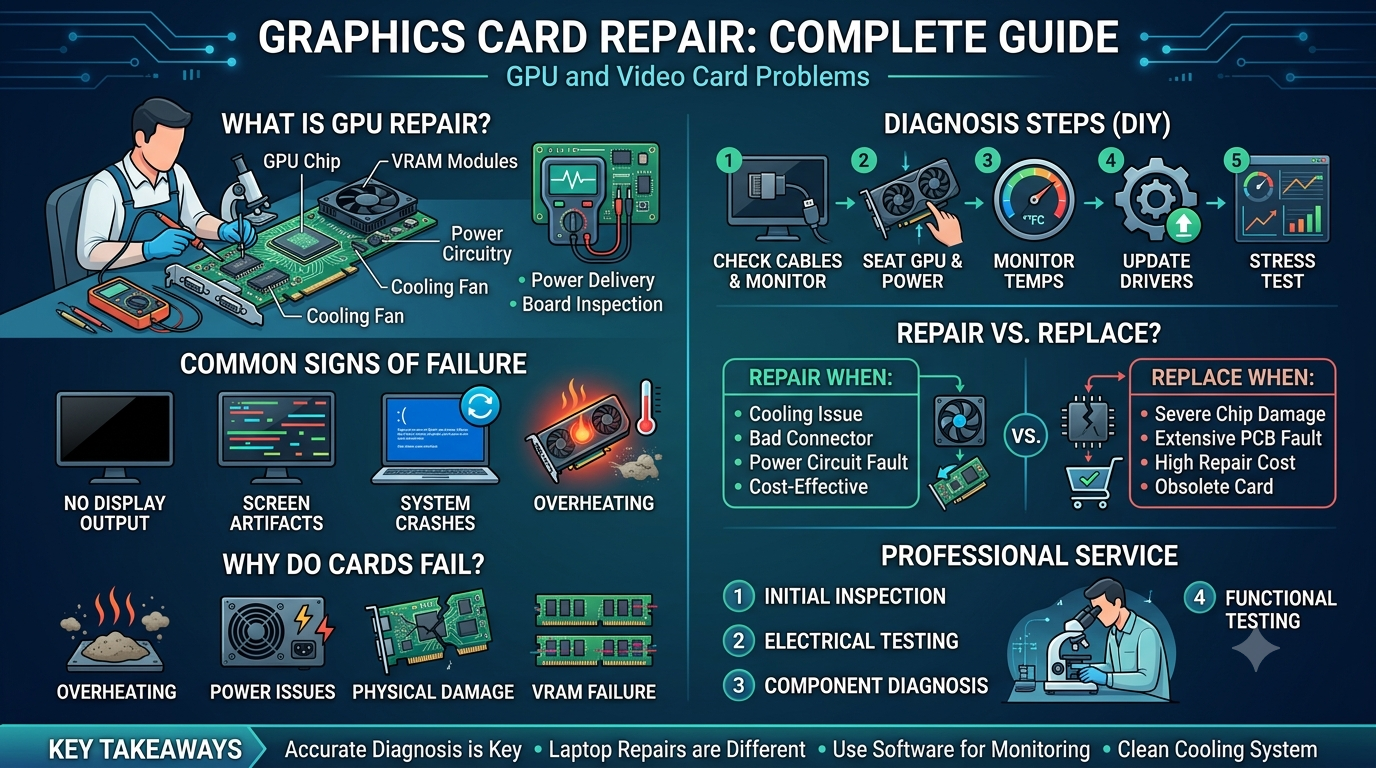
A Graphics Card Repair contains several components that work together. These can include the GPU chip, VRAM, voltage regulation modules, capacitors, resistors, cooling fans, heat sinks, display connectors, and circuit-board traces. A problem with any of these components can affect graphics performance.
Professional video card repair generally begins with diagnosis rather than immediately replacing components. A technician may test the card in a compatible system, check power delivery, inspect the PCB, monitor temperatures, test memory, examine display output, and identify whether the problem is hardware- or software-related.
The goal of repair graphics card work is to identify the actual failure and determine whether the component can be safely restored.
Read more about: iPhone 18 Pro Goes on Sale Tomorrow in India | UPI Charges From October 15, 2026 | How to Clean Computer Screen Safely | OpenAI News Today
Common Signs That Your Graphics Card Needs Attention
Several symptoms can indicate that a GPU requires troubleshooting or professional inspection.
1. No Display Output
A computer may power on while the monitor remains completely black. If the monitor, cable, RAM, motherboard, and power supply are working correctly, the Graphics Card Repair may be involved.
Before considering videocard repair, test another display cable, monitor, and appropriate output port. If the problem continues, further diagnosis may be necessary.
2. Screen Artifacts
Colored squares, lines, flashes, unusual textures, and distorted shapes are commonly called graphical artifacts. They can occur because of overheating, unstable memory, driver problems, damaged VRAM, or other hardware faults.
Persistent artifacts during BIOS startup or before the operating system loads are particularly useful diagnostic clues because they may indicate a hardware-level problem.
3. Random System Crashes
GPU failures can cause application crashes, system freezes, blue-screen errors, or unexpected restarts. However, these symptoms can also result from defective RAM, an unstable power supply, overheating, motherboard problems, or software conflicts.
This is why graphics card repair should begin with proper diagnosis instead of assuming that the GPU is automatically defective.
4. Overheating
A Graphics Card Repair that becomes excessively hot may reduce its clock speed, crash applications, or shut down the computer to protect itself.
Dust buildup, blocked airflow, worn thermal paste, damaged fans, and poor case ventilation can contribute to overheating. Cleaning the cooling system and replacing appropriate thermal materials may resolve some temperature-related problems.
5. Driver Errors
Windows may report that the display driver has stopped responding or has recovered after a crash. A corrupted or incompatible driver can cause display problems that look like hardware failure.
A clean driver installation, operating-system update, or rollback to a stable driver version can sometimes solve the issue without hardware work.
Why Do Graphics Cards Fail?
Understanding the cause of failure helps determine whether repair Graphics Card Repair work is practical.
Overheating
Heat is one of the most common concerns for high-performance GPUs. Continuous operation at high temperatures can put stress on electronic components and may contribute to instability over time.
Poor airflow, dust, blocked fans, and inadequate cooling can make the situation worse.
Power Problems
A GPU requires stable power. An inadequate or failing power supply, damaged PCIe power connector, loose connection, or electrical fault can result in crashes or failure to start.
Professional video card repair diagnosis should include checking the power delivery system rather than focusing only on the GPU chip.
Physical Damage
A Graphics Card can be damaged during installation, transportation, cleaning, or removal. Bent connectors, cracked PCB sections, damaged components, and broken fan assemblies may affect operation.
VRAM Failure
Graphics cards use dedicated video memory to store textures, frames, and other visual data. Defective VRAM can result in artifacts, crashes, corrupted images, and application instability.
Driver or Firmware Problems
Not every Graphics Card Repairs problem requires physical repair. Incorrect drivers, firmware problems, operating-system conflicts, or incompatible software can create symptoms that resemble hardware failure.
A good gpu repair software approach focuses on diagnosis, driver management, monitoring, and configuration rather than claiming that software can physically repair damaged electronic components.
Graphics Card Repair vs. Graphics Card Replacement
One of the most important questions is whether to repair or replace a damaged GPU.
A repair may make sense when the problem is caused by a replaceable component, cooling issue, connector, power circuit, or other serviceable fault. Replacement may be more practical when the GPU chip or PCB has extensive damage, the repair cost is too high, or a reliable replacement is readily available.
A professional technician can compare:
- Cost of diagnosis
- Cost of replacement components
- Labor requirements
- Age of the graphics card
- Original performance level
- Availability of replacement parts
- Expected reliability after repair
- Warranty or service coverage
This evaluation makes graphics card repair a decision based on the actual condition of the hardware rather than guesswork.
How to Diagnose a Graphics Card Problem
Before attempting complex videocard repair, users can perform several basic checks.
Step 1: Check the Display Cable
Make sure the HDMI, DisplayPort, DVI, or other cable is securely connected. If possible, test another known-working cable.
Step 2: Test Another Monitor
A defective monitor can create symptoms that look like GPU failure. Connecting the computer to another compatible display can help isolate the problem.
Step 3: Check GPU Connections
For a desktop graphics card, make sure the card is properly seated in the PCIe slot and that required power connectors are securely attached.
Do not force a connector or remove internal hardware while the computer is powered on.
Step 4: Monitor Temperatures
Use trusted monitoring software to observe GPU temperature, clock speeds, fan operation, and utilization. Abnormally high temperatures may indicate cooling problems.
Step 5: Update or Roll Back Drivers
If the problem appeared immediately after a driver update, rolling back to a stable version may help. If the driver installation is corrupted, a clean installation may be useful.
Step 6: Test Under Different Workloads
If artifacts appear only during demanding games or rendering applications, monitor temperature, power usage, and GPU stability. If the issue occurs even during startup or light desktop use, hardware problems may deserve greater attention.
Can You Repair a Graphics Card Yourself?
Basic troubleshooting is possible for many users, but board-level repair is different from software troubleshooting.
Simple actions such as cleaning external dust, checking cables, reinstalling drivers, and improving airflow can be performed carefully by users who understand the relevant safety precautions.
However, opening a graphics card, testing electronic components, replacing surface-mounted components, or performing board-level soldering requires appropriate equipment and technical knowledge.
When users search for fixing a Graphics Card Repair, they may encounter suggestions such as heating the PCB or attempting improvised component repairs. These methods can cause additional damage and should not be treated as reliable professional repair procedures.
If the card has a suspected electrical or board-level fault, professional diagnosis is generally safer.
Laptop Graphics Card Problems
Laptop GPU problems can be more complicated than desktop GPU problems because the graphics processor may be integrated into the motherboard or soldered directly to it.
This means a traditional removable graphics card cannot always be replaced independently.
Laptop GPU Symptoms
Common symptoms include:
- Black screen
- Random graphical artifacts
- Display flickering
- Driver crashes
- Excessive GPU temperatures
- System shutdowns
- Gaming crashes
- External monitor problems
- GPU not appearing correctly in the operating system
When users search for repair laptop gpu, they should first determine whether the GPU is dedicated, integrated, or part of the motherboard.
Laptop Graphics Chip Repair
Laptop graphics chip repair can involve diagnosing the GPU, motherboard power circuitry, memory, display circuitry, and thermal system.
A laptop may also have a Graphics Card Repair processor that shares cooling hardware with the CPU. If the cooling system becomes blocked with dust, both components can experience temperature-related problems.
A technician performing laptop video card repair may inspect the motherboard under magnification, test power rails, check GPU behavior, inspect VRAM, and evaluate thermal performance.
Because many laptop GPUs are soldered to the motherboard, repair requirements can be substantially different from desktop GPU service.
When Laptop GPU Repair Is Possible
If a laptop has a software, driver, thermal, power, or supporting-component problem, repair may be relatively straightforward.
For example, a technician may be able to resolve:
- Driver corruption
- Cooling problems
- Fan failures
- Thermal issues
- Power delivery faults
- Connector problems
- Certain motherboard component failures
However, a severely damaged GPU chip or motherboard may require replacement rather than component-level restoration.
Users searching for repair video card laptop services should provide the exact laptop model because GPU architecture varies significantly between manufacturers and generations.
What Is an XRMPE Video Card Error?
The phrase xrmpe veideo card error may appear in search queries from users experiencing a graphics-related error or application-specific message. Because unusual error terms can be caused by different software environments, the exact message should be verified before choosing a repair method.
If you encounter an xrmpe veideo card error, record the complete error text, application name, operating system, GPU model, and the point at which the error appears.
This information can help distinguish between a driver problem, application compatibility issue, GPU configuration problem, or hardware fault.
Avoid replacing a graphics card solely because an unfamiliar error appears. Proper diagnosis is important.
Graphics Card Repair Software: What Can It Actually Do?
The term gpu repair software can be misleading. Software cannot physically repair a damaged GPU chip, burned component, broken PCB trace, or failed VRAM module.
However, diagnostic and management software can help identify problems.
Useful software functions may include:
- GPU temperature monitoring
- Fan-speed monitoring
- Clock monitoring
- Driver installation
- Driver rollback
- Stress testing
- Artifact detection
- Power monitoring
- System information
- BIOS and firmware identification
Software-based troubleshooting is particularly useful when the problem is caused by configuration or drivers rather than physical damage.
Professional Graphics Card Repair Service
A professional graphics card repair service should follow a structured diagnostic process.
Initial Inspection
The technician checks the physical condition of the card, including connectors, fans, PCB condition, visible damage, and signs of overheating.
Electrical Testing
Specialized equipment may be used to check voltage rails, resistance, power delivery, and other electrical characteristics.
Component-Level Diagnosis
If required, the technician may inspect components such as MOSFETs, capacitors, VRMs, memory chips, and other board-level parts.
Thermal Testing
The cooling system is checked for fan operation, heat-sink contact, dust accumulation, and abnormal temperature behavior.
Functional Testing
After service, the graphics card should be tested under appropriate workloads to determine whether the original symptoms have been resolved.
This type of structured video card repair process is more reliable than replacing random components without confirming the underlying fault.
How to Choose a GPU Repair Service Near You
If you search for gpu repair service near me, do not select a provider based only on proximity.
Consider the following factors:
Experience
Ask whether the technician regularly handles graphics cards and GPU-related motherboard problems.
Diagnostic Process
A reputable service should explain how the fault will be identified before expensive repairs are performed.
Equipment
Board-level GPU service may require professional diagnostic equipment, microscopes, soldering equipment, thermal testing tools, and electrical measurement equipment.
Transparency
The service provider should explain the suspected fault, estimated cost, and repair limitations.
Warranty
Ask whether repaired work includes a service warranty and what it covers.
Data and System Safety
If your graphics problem is associated with a laptop or complete computer, confirm how your files and system will be handled during diagnosis.
How to Prevent Graphics Card Problems
Preventive maintenance can reduce the risk of many GPU-related problems.
Keep the Cooling System Clean
Dust restricts airflow and can cause fans and heat sinks to work less effectively.
Maintain Good Airflow
A desktop case should have appropriate intake and exhaust airflow. Avoid blocking laptop ventilation openings.
Monitor Temperatures
Sudden temperature increases can indicate cooling or fan problems.
Use a Reliable Power Supply
A quality, correctly sized PSU can provide stable power to a desktop graphics card.
Keep Drivers Updated Carefully
Drivers should come from legitimate manufacturer sources. If a new driver causes instability, investigate compatibility rather than repeatedly installing different versions without diagnosis.
Avoid Unsafe Modifications
Aggressive overclocking, excessive voltage changes, and improvised hardware modifications can increase the risk of instability or component damage.
Signs That You Should Stop Troubleshooting Yourself
DIY troubleshooting is reasonable for basic software and connection problems, but stop and seek professional assistance when:
- There is a burning smell.
- The PCB shows visible damage.
- A component appears burned or cracked.
- The GPU repeatedly shuts down.
- The card becomes extremely hot.
- There is evidence of liquid damage.
- The computer cannot safely power on.
- You need board-level soldering.
- The GPU has suspected electrical damage.
- Previous Graphics Card Repair attempts have made the problem worse.
Attempting to repair graphics card hardware without the correct tools can turn a repairable fault into permanent damage.
Graphics Card Repair Cost Factors
The cost of graphics card repair varies depending on the fault and the complexity of the service.
Factors can include:
- GPU model
- Age of the graphics card
- Type of failure
- Availability of replacement components
- Labor requirements
- Board-level repair complexity
- Cooling-system condition
- Testing requirements
- Whether the GPU chip itself has failed
A simple cooling problem may require much less work than a board-level electrical fault.
For laptop systems, laptop graphics chip repair can be more complex because the GPU may be integrated into the motherboard. In such cases, the technician must evaluate the complete motherboard before deciding whether repair is economical.
Why Professional Diagnosis Matters
Many GPU symptoms overlap with other computer problems. A black screen could result from the GPU, RAM, monitor, cable, motherboard, power supply, or operating system.
Likewise, crashes may result from drivers, overheating, unstable memory, software conflicts, or hardware failure.
Professional videocard repair therefore starts with identifying the actual cause instead of assuming the graphics card is defective.
A good diagnostic process can prevent unnecessary replacement and help users understand whether repair, replacement, or software troubleshooting is appropriate.
Read more about: GTA 6 Cost | Global Esports (GE) Wins First VCT Pacific Championship | BGMS Season 5 Winner | Forza Horizon 6
Final Thoughts
Graphics Card Repair problems can range from simple driver conflicts and cooling issues to complex electrical or component-level failures. The right solution depends on identifying the exact cause.
Basic checks such as testing cables, displays, drivers, temperatures, and connections can resolve some issues. More complicated failures require professional equipment and technical expertise.
Whether you need desktop graphics card repair, video card repair, laptop GPU troubleshooting, or board-level diagnosis, the most important step is accurate fault identification. A professional service can evaluate the hardware, explain the available repair options, estimate the cost, and determine whether repairing the existing GPU is more practical than replacing it.
For users dealing with persistent artifacts, no display, overheating, crashes, or unexplained GPU errors, professional diagnosis can help avoid unnecessary component replacement and provide a clearer path toward restoring reliable graphics performance.
Frequently Asked Questions
Q1. What is graphics card repair?
Graphics card repair involves diagnosing and fixing problems affecting a GPU, its power circuitry, VRAM, cooling system, connectors, or supporting components. Some faults can be repaired, while severe GPU-chip damage may require replacement.
Q2. Can a damaged graphics card be repaired?
Yes, some graphics card faults can be repaired. Cooling problems, certain power-circuit failures, damaged connectors, and some component-level faults may be serviceable. A technician must diagnose the card before determining whether repair is practical.
Q3. What are the most common signs of a faulty video card?
Common symptoms include screen artifacts, black screens, flickering, crashes, overheating, driver failures, distorted graphics, and unexpected shutdowns. Similar symptoms can also originate from other computer components.
Q4. Can I repair a laptop GPU?
Repair laptop gpu work depends on the laptop’s design and the type of failure. Many laptop GPUs are soldered to the motherboard, so professional board-level diagnosis may be necessary.
Q5. Does GPU repair software fix a physically damaged graphics card?
No. Gpu repair software can help diagnose temperatures, drivers, clocks, stability, and configuration problems, but it cannot physically repair damaged chips, PCB traces, or electronic components.
Q6. How much does graphics card repair cost?
The price depends on the GPU model, failure type, parts required, labor, and testing. A cooling or connector issue may be simpler to resolve than a complex board-level electrical failure.
Q7. Should I repair or replace my graphics card?
The decision depends on the card’s age, performance, repair cost, availability of replacement parts, and expected reliability. A professional diagnosis can help compare repair with replacement.
Q8. How do I find a reliable GPU repair service near me?
When searching for gpu repair service near me, check technician experience, diagnostic equipment, repair transparency, warranty terms, customer reviews, and whether the provider handles board-level GPU problems. Always ask for a diagnosis and estimate before approving major work.