
 By
By Artificial intelligence has transformed software development, making coding faster, smarter, and more accessible. Tools like ChatGPT, Claude, Cursor, and GitHub Copilot can generate code in seconds, but they often struggle with one major problem they don’t always know the latest version of a framework, library, or API. This results in outdated code, deprecated functions, and inaccurate implementations.
That’s where Context7 AI changes everything.
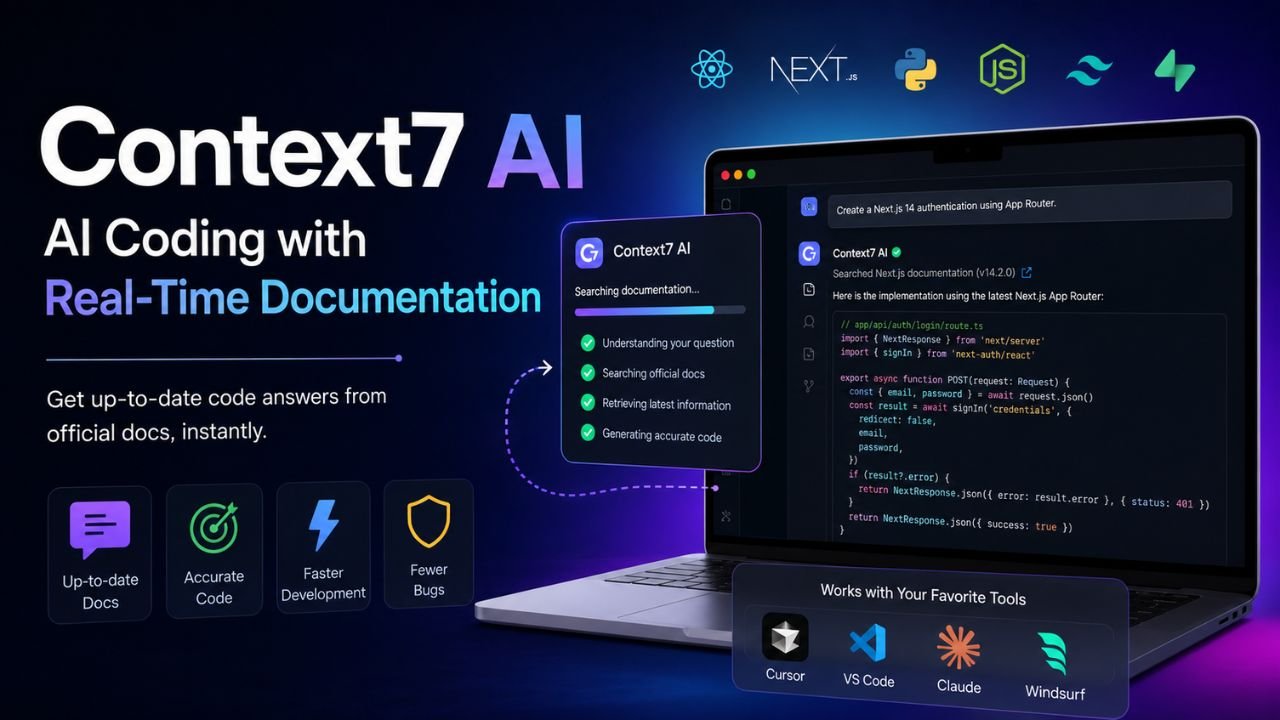
Instead of relying only on the knowledge already stored inside a language model, Context7 AI supplies live documentation directly from official sources. It ensures your AI coding assistant always works with the latest APIs, frameworks, and libraries, helping developers write accurate and production-ready code.
Whether you’re building applications with React, Next.js, Python, FastAPI, LangChain, or any modern framework, Context7 AI provides the context your AI needs to generate reliable code.
In this complete guide, you’ll learn what Context7 AI is, how it works, why developers are switching to it, how to install it, and how to use it with Cursor, Claude, VS Code, and Python projects.
Also read: Pressure Marks on Laptop Screen | Bug in Monitor | Top 10 Inverter Battery in India
What is Context7 AI?
Context7 AI is an AI-powered documentation retrieval system that delivers the latest official documentation directly to AI coding assistants before they generate responses.
Unlike traditional AI models that rely on training data collected months or years ago, it’s retrieves real-time documentation from trusted sources. This allows large language models (LLMs) to answer programming questions using current APIs instead of outdated examples.
Think of Context7 AI as a bridge between your AI assistant and official documentation.
Instead of asking:
“Write a Next.js authentication example.”
An AI without documentation may generate code from an older version.
With Context7 AI, the assistant first checks the latest Next.js documentation and then produces code based on the newest API.
This dramatically improves code quality while reducing debugging time.
Why Developers Need Context7 AI
Modern software frameworks evolve rapidly.
A single update can introduce:
- New APIs
- Deprecated methods
- Changed syntax
- New configuration options
- Updated package structures
Unfortunately, most AI assistants cannot automatically learn these updates after their training cutoff.
This creates several problems:
- Incorrect imports
- Deprecated functions
- Invalid configuration files
- Broken installation commands
- Security issues caused by outdated implementations
It’s solves these challenges by giving AI assistants access to the latest official documentation during every coding session.
Instead of guessing, the AI references real documentation before answering.
The Biggest Problem with Traditional AI Coding Assistants
AI coding assistants are excellent at understanding programming concepts, but they often fail when working with fast-changing technologies.
Imagine asking an AI to build an authentication system using the latest version of Next.js.
If the model was trained before the newest release, it may generate:
- Obsolete folder structures
- Removed APIs
- Deprecated middleware
- Outdated authentication methods
The generated code might look correct but fail during execution.
This forces developers to:
- Search documentation manually
- Debug generated code
- Compare old and new APIs
- Rewrite large sections
Instead of saving time, developers spend additional hours fixing AI-generated mistakes.
That is precisely the problem it’s was designed to eliminate.
How Context7 AI Works
The workflow behind Context7 AI is surprisingly simple.
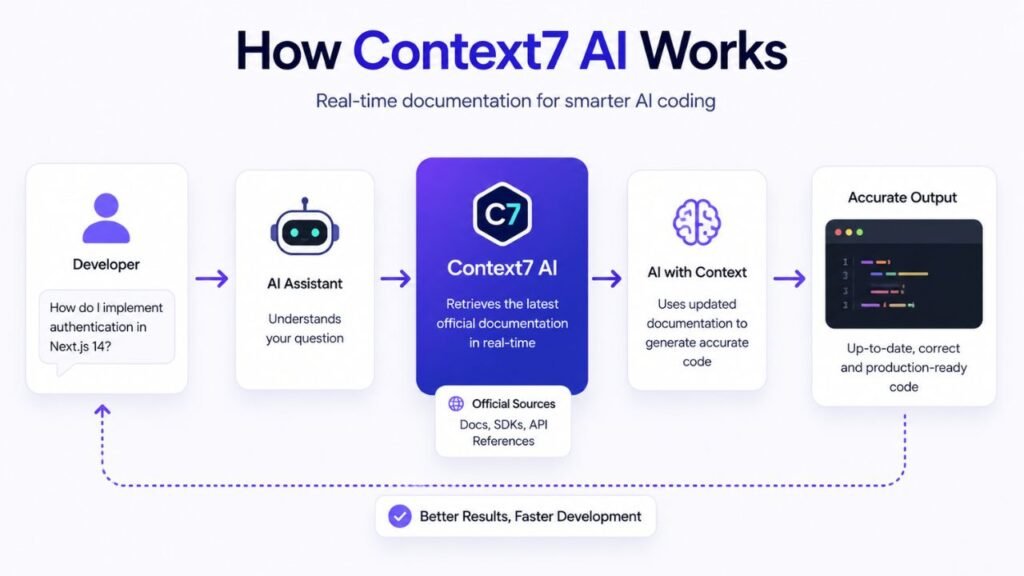
Instead of allowing an LLM to answer immediately, it’s inserts an additional documentation retrieval step.
The process works like this:
Step 1: User Sends a Prompt
Example:
Build a FastAPI authentication system using JWT.
Step 2: Context7 AI Identifies Required Libraries
The system understands the request involves:
- FastAPI
- JWT
- Python
- Authentication
- Security dependencies
Step 3: Documentation Retrieval
Before generating any code, it’s retrieves the latest documentation from official sources.
Instead of depending only on pre-trained knowledge, it fetches updated implementation details.
Step 4: Context Injection
The retrieved documentation is automatically added to the AI’s context window.
Now the language model has access to:
- Latest syntax
- New APIs
- Updated configuration
- Official examples
- Recommended practices
Step 5: AI Generates Accurate Code
Only after receiving the documentation does the AI begin generating code.
This results in:
- Fewer hallucinations
- Better code quality
- Updated syntax
- Production-ready examples
- Significantly fewer debugging issues
Key Features of Context7 AI
The growing popularity of Context7 AI comes from its practical approach to solving one of AI’s biggest limitations.
Here are its standout features.
Real-Time Documentation
Instead of relying on outdated training data, it’s retrieves live documentation from official project sources.
Developers receive answers based on the latest framework versions rather than historical knowledge.
Better Code Accuracy
Since the AI references current documentation before generating code, the resulting implementations closely match official recommendations.
This minimizes syntax errors and deprecated API usage.
Reduced AI Hallucinations
One of the biggest challenges with LLMs is hallucination where the model confidently generates incorrect information.
Because Context7 AI injects verified documentation into the prompt, hallucinations are greatly reduced during coding tasks.
Framework Awareness
Context7 AI supports many modern technologies, including:
- React
- Next.js
- Vue
- Angular
- Python
- FastAPI
- Django
- Node.js
- Express
- LangChain
- OpenAI SDK
- Vercel AI SDK
- Supabase
- Prisma
- Tailwind CSS
- Astro
- Nuxt
- Laravel
As new frameworks evolve, it’s can continue supplying updated documentation without requiring a new AI model.
Faster Development
Developers no longer need to:
- Open multiple documentation tabs
- Search Stack Overflow
- Compare GitHub issues
- Verify API changes manually
Instead, it’s provides relevant documentation directly within the coding workflow.
This significantly speeds up development.
Benefits of Using Context7 AI
Whether you’re an individual developer or part of a software team, it’s offers several practical advantages.
Higher Productivity
Developers spend less time switching between documentation websites and their IDE.
Everything required for implementation appears directly within the AI conversation.
Better Learning Experience
Beginners often struggle to understand official documentation.
With Context7 AI, explanations are generated alongside documentation, making complex APIs easier to understand.
Improved Team Consistency
When every developer receives answers based on the same official documentation, projects become more consistent.
This reduces confusion caused by outdated tutorials or conflicting code examples.
Faster Onboarding
New developers can become productive more quickly because it’s explains both the framework and the implementation using current documentation.
Lower Maintenance Costs
Using updated APIs from the beginning reduces future refactoring caused by deprecated features.
Projects stay aligned with modern best practices.
Real-World Example: Without vs With Context7 AI
Imagine you’re building a Next.js application using the latest App Router.
Without Context7 AI
You ask your AI assistant:
Create authentication using Next.js.
Possible result:
- Old Pages Router structure
- Deprecated authentication methods
- Outdated imports
- Broken middleware
Hours later, you’re fixing generated code.
With Context7 AI
The same request goes through it’s first.
It retrieves the latest Next.js documentation and provides the AI with current implementation details.
The generated code now follows:
- Latest App Router conventions
- Current authentication flow
- Updated middleware
- Recommended folder structure
- Official best practices
Instead of debugging outdated code, you can focus on building your application.
Why Context7 AI Is Becoming Popular in 2026
As AI-assisted development becomes the standard, developers expect coding assistants to produce code that actually works with the latest technologies. Outdated examples are no longer acceptable when frameworks release updates every few weeks.
Context7 AI addresses this need by combining the reasoning ability of large language models with fresh, official documentation. This makes AI-generated code more trustworthy, especially for rapidly evolving ecosystems like React, Next.js, Python libraries, AI SDKs, and cloud platforms.
Because of this approach, more developers are adopting Context7 AI as an essential companion for modern AI coding workflows rather than relying solely on an LLM’s built-in knowledge.
Installing Context7 AI
Getting started with Context7 AI is straightforward. While the exact setup depends on the AI coding tool you use, the overall process remains similar.
Step 1: Install Your Preferred AI Coding Assistant
It works alongside modern AI development tools rather than replacing them. Popular options include:
- Cursor
- Claude Desktop
- VS Code AI extensions
- Windsurf
- Compatible MCP-enabled applications
Step 2: Configure Context7 AI
After installation, connect it to your AI assistant. During this step, the assistant gains access to documentation retrieval before generating responses.
Step 3: Start Coding
Once configured, simply ask coding questions as you normally would.
Instead of relying only on the LLM’s training data, it’s automatically provides current documentation to improve every response.
How to Use Context7 AI with Cursor
Cursor has become one of the most popular AI-powered code editors, and it works exceptionally well with it.
A typical workflow looks like this:
- Open your project in Cursor.
- Ensure Context7 AI is connected through the supported integration.
- Open the AI chat panel.
- Ask your programming question.
For example:
Create a REST API using FastAPI with JWT authentication.
Rather than producing outdated examples, it’s supplies the latest FastAPI documentation before Cursor generates the final implementation.
This leads to cleaner code with fewer deprecated APIs and configuration errors.
Using Context7 AI with Claude
Claude is widely used for software engineering because of its long context window. Adding Context7 AI makes it even more reliable.
Instead of manually copying documentation into Claude, It retrieves relevant documentation automatically.
Developers can ask questions like:
- Build a React dashboard.
- Configure Prisma.
- Create a Supabase authentication flow.
- Explain the latest LangChain syntax.
Claude then responds using updated documentation instead of older training examples.
Using Context7 AI with VS Code
Many developers still prefer Visual Studio Code as their primary IDE.
When paired with supported AI extensions, it’s improves documentation accuracy directly inside the editor.
Common use cases include:
- code generation
- debugging
- API integration
- framework migration
- explaining unfamiliar libraries
This minimizes context switching between documentation websites and your development environment.
Context7 AI for Python Development
Python developers benefit significantly from Context7 AI, especially because the Python ecosystem evolves rapidly.
Instead of referencing outdated packages, it can guide AI assistants using the latest documentation for frameworks such as:
- FastAPI
- Django
- Flask
- LangChain
- Pandas
- NumPy
- OpenAI SDK
- Pydantic
- SQLAlchemy
For example, if you ask:
Build a FastAPI CRUD application.
The AI generates code based on the newest FastAPI recommendations rather than obsolete syntax.
What is MCP and Why Does Context7 AI Use It?
One of the technologies often mentioned alongside Context7 AI is the Model Context Protocol (MCP).
MCP is an open protocol that allows AI models to securely communicate with external tools, databases, APIs, and documentation providers.
Instead of embedding all knowledge inside the language model, MCP lets the model retrieve information whenever it is needed.
For Context7 AI, MCP serves as the communication layer that delivers fresh documentation into the AI’s context before a response is generated.
This architecture offers several benefits:
- live information retrieval
- modular integrations
- improved security
- reusable tool ecosystem
- better scalability
As more AI development tools adopt MCP, it becomes even more useful across different coding environments.
Context7 AI vs Traditional AI Coding
| Feature | Traditional AI | Context7 AI |
| Uses official documentation | ❌ | ✅ |
| Updated APIs | ❌ | ✅ |
| Live documentation retrieval | ❌ | ✅ |
| Reduced hallucinations | Limited | Yes |
| Production-ready code | Sometimes | More consistently |
| Latest framework support | Limited by training data | Continuously updated |
For developers working with fast-changing technologies, it offers a clear advantage.
Context7 AI vs GitHub Copilot
Although GitHub Copilot is an excellent coding assistant, it primarily relies on its underlying AI model and available project context.
It’s complements this by adding fresh documentation before code generation.
GitHub Copilot
- Great autocomplete
- Strong code suggestions
- Fast inline assistance
- Limited by available context
Context7 AI
- Live documentation retrieval
- Official framework references
- Better API accuracy
- Lower risk of outdated implementations
Many developers choose to combine both tools rather than viewing them as competitors.
Advantages of Context7 AI
There are several reasons why developers are adopting Context7 AI in 2026.
Always Current
Documentation is retrieved from official sources, ensuring responses reflect the latest framework versions.
Better AI Responses
Providing accurate context helps the language model generate more precise code.
Fewer Bugs
Outdated APIs are one of the biggest causes of AI-generated coding errors. It helps reduce these mistakes.
Saves Development Time
Developers spend less time searching documentation and more time building applications.
Improves Learning
Beginners can understand modern frameworks more easily because explanations are grounded in current documentation.
Limitations of Context7 AI
Like any development tool, it’s not perfect.
Some limitations include:
- Requires internet access for live documentation retrieval.
- Documentation quality depends on the official project.
- Very new libraries may have limited documentation.
- AI-generated code should still be reviewed before deployment.
Even with Context7 AI, developers should test and validate code before using it in production.
Best Use Cases for Context7 AI
It’s especially valuable in scenarios where documentation changes frequently.
Examples include:
- Building AI applications
- React and Next.js development
- Backend API development
- Python automation
- LangChain projects
- Cloud application deployment
- Database integrations
- Authentication systems
- SDK implementations
- Framework migrations
In each of these areas, access to current documentation significantly improves development speed and accuracy.
Tips for Getting Better Results with Context7 AI
To make the most of Context7 AI, follow these best practices:
- Be specific in your prompts.
- Mention framework versions whenever possible.
- Ask for complete project structures instead of isolated code snippets.
- Request explanations alongside generated code.
- Review and test the generated implementation before deployment.
- Combine Context7 AI with version control and automated testing for a reliable workflow.
These habits help AI assistants produce more useful and maintainable code.
Final Thoughts
As AI-assisted software development becomes the norm, accurate context is just as important as powerful language models. Even the best coding assistants can generate outdated or incorrect implementations if they lack access to current documentation.
It’s addresses this challenge by bridging the gap between AI models and official developer resources. Instead of relying solely on historical training data, it retrieves live documentation and injects it into the conversation, enabling more reliable code generation, fewer hallucinations, and faster development workflows.
Whether you’re building a Python backend, a React application, a Next.js project, or an AI-powered product with modern SDKs, Context7 AI helps ensure your coding assistant stays aligned with the latest best practices. For developers who value accuracy, productivity, and up-to-date implementations, it’s quickly becoming an essential part of the modern development toolkit in 2026.
Also read about: Heart Attack Treatment and Management | Left Shoulder Pain Symptoms | Right Side Chest Pain
Frequently Asked Questions
Q1: What is Context7 AI?
Context7 AI provides current documentation to AI coding assistants, helping them generate code using the latest APIs and frameworks.
Q2: Is Context7 AI free to use?
Context7 AI may offer free access depending on the platform or integration, while some usage or services may have separate costs.
Q3: Does Context7 AI work with Cursor?
Yes. Context7 AI can work with Cursor through supported integrations to provide updated documentation during coding tasks.
Q4: Can Context7 AI be used with Python?
Yes. It can provide current documentation for Python libraries and frameworks such as FastAPI, Django, Flask, and Pydantic.
Q5: Does Context7 AI replace ChatGPT or Claude?
No. Context7 AI complements AI models such as ChatGPT and Claude by supplying relevant, up-to-date documentation.
Q6: How does Context7 AI reduce coding errors?
It retrieves current documentation and provides it to the AI before code generation, reducing outdated APIs, deprecated functions, and incorrect examples.
Q7: What is MCP in Context7 AI?
MCP, or Model Context Protocol, allows AI applications to connect with external tools and information sources such as documentation.
Q8: Is Context7 AI useful for developers?
Yes. It can save development time, improve code accuracy, simplify documentation research, and help developers work with rapidly changing technologies.




1 Comment